How to Apply
Follow these steps to secure your laptop. Ensure you have met all eligibility criteria before proceeding.
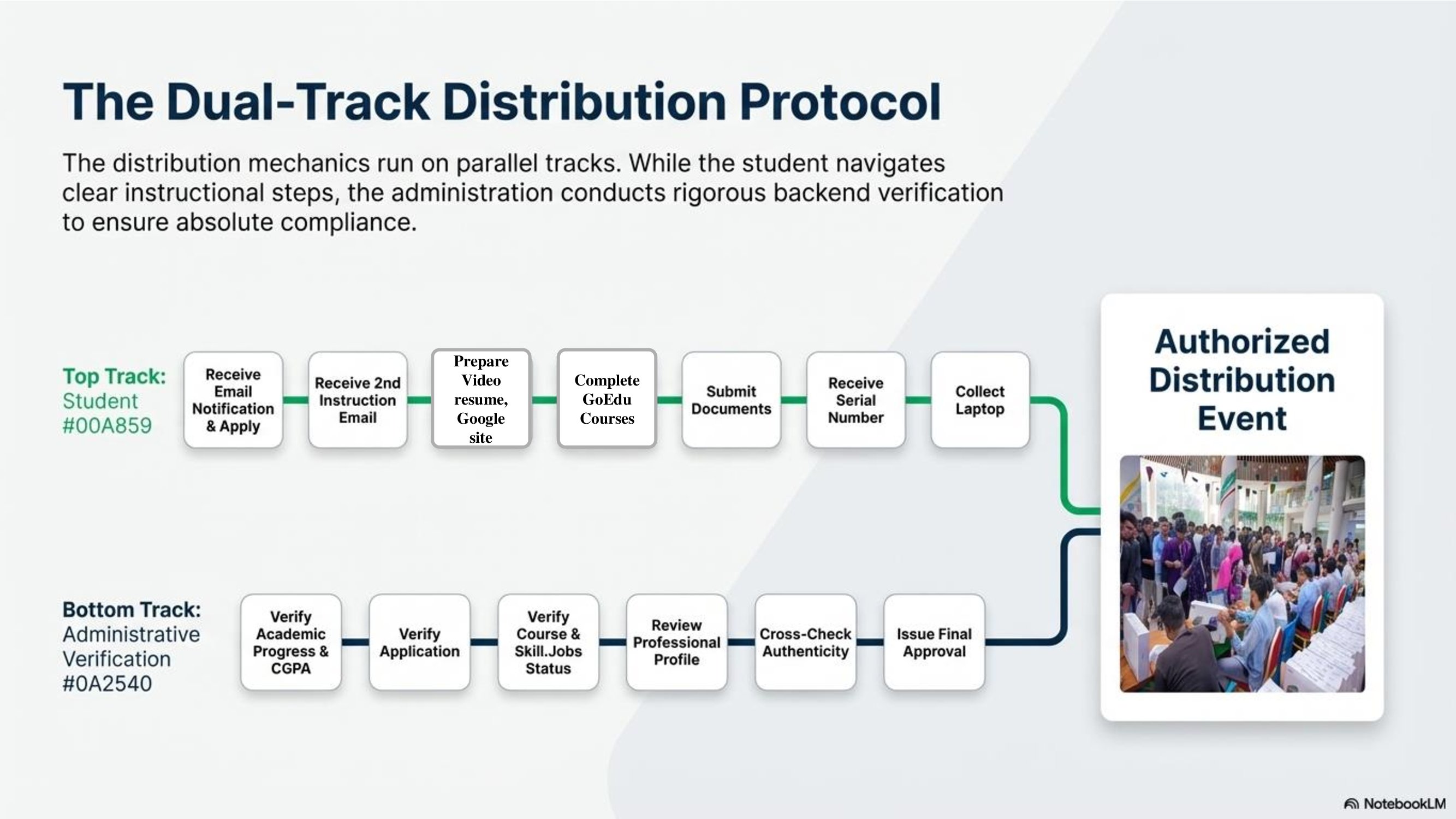
Student Participation Process
Email Notification
Receive an official email informing them about eligibility and the application process.
Application Submission
Submit the required application form as instructed
Second Instruction Email
After the initial review, receive detailed instructions for the next steps..
Preparation of Professional Materials
Prepare a video resume, Google Site, and presentation, ensuring all required academic credits are completed.
Course Completion
Complete at least 4 GoEdu courses, Employability 360 course, and English course with a minimum grade of B.
Professional Profile Development
Create and complete a LinkedIn profile, Google Scholar profile, BLC Account Opening, and Research Gate account to establish a professional academic and research presence.
Document Submission
Submit all necessary documents correctly through the designated platform. Submission Link Process: Login Student Portal ----> Student Portal ----> Student Service ----> Laptop----> Submitted Document Serial Number Allocation: Receive a serial number after successful submission and preliminary verification.
Serial Number Allocation
Receive a serial number after successful submission and preliminary verification.
Distribution Schedule Notification
Receive final notification containing the laptop receiving date, time, and venue.
Laptop Collection
Appear at the designated location on the scheduled date and collect the laptop, successfully completing the process.
Administrative Verification Process
Academic Progress
Verification of completed credits and current academic status.
Academic Performance
Review of the student’s latest results and overall CGPA.
Disciplinary Record
Checking for any proctorial allegations or disciplinary actions.
Application Verification
Confirmation that the student has properly submitted the official application.
Course Completion
Verification that the student has completed the required GoEdu courses: at least 4 elective courses, Employability 360 course, and an English course with a minimum grade of B.
Skill Jobs Requirements
Confirmation of Skill Jobs enrollment and clearance status.
Professional Profile
Review of the student’s video resume, CV, and Google Site to ensure they meet the required standards.
Document Accuracy
Cross-checking all submitted documents for correctness and authenticity..
Video Resume Tutorial
Step-by-step guide for a perfect submission
How to Prepare Your Video Resume
A high-quality video resume is crucial for your application. It reflects your communication skills and professionalism. Follow these official guidelines to ensure your submission is accepted.
Dress Code
Formal attire is mandatory. Male: Blazer with Tie. Female: Decent Salwar Kamiz/Saree. No T-shirts.
Background & Lighting
Choose a professional, clutter-free background. Ensure your face is well-lit.
Audio & Duration
Clear sound quality is essential. Keep video length between 2.5 to 5 minutes.
Important Notes
- All submissions must be made before the deadline mentioned in your invitation email.
- Incomplete applications will not be processed.
- Ensure your Google Site portfolio is set to "Public" for review.
- Video resumes must be uploaded to YouTube with public access.
- For technical support, contact Office of the students’ Affairs (OSA) or Skill Job or email support@diu.edu.bd